
Jez always love you
---> https://metaverse-addon.onrender.com
🎬 Metaverse – The Ultimate Metadata Addon for Stremio
Metaverse is a comprehensive metadata discovery addon for Stremio, designed to provide high-quality movie and series information from various streaming platforms and regional cinema. It bridges the gap between discovery and playback by providing a rich browsing experience.
Metaverse does NOT host, store, or distribute any video content. It is a metadata-only provider that works alongside your existing streaming addons.
✨ Features
- 🚀 Multi-Platform Catalogs: Discovery content from Netflix, Amazon Prime, Apple TV+, Hulu, and more in one place.
- 🎥 Regional Cinema Support: Dedicated catalogs for Malayalam, Tamil, and Hindi movies.
- 🎭 Specialized Collections: Handpicked catalogs for Marvel, DC, SonyLIV, and Zee5.
- 🔍 Unified Search: Integrated search functionality across all supported catalogs.
- ⚡ Infinite Scroll: Smooth browsing experience with stable pagination using TMDB data.
- 🖼 Premium Posters: Integrated support for RPDB (Poster DB) for high-resolution, consistent artwork.
- 🧠 IMDb Ecosystem: Native behavior using IMDb ID resolution, ensuring compatibility with all major streaming addons.
- 💾 Smart Caching: In-memory caching for TMDB requests to ensure lightning-fast responses and stay within API limits.
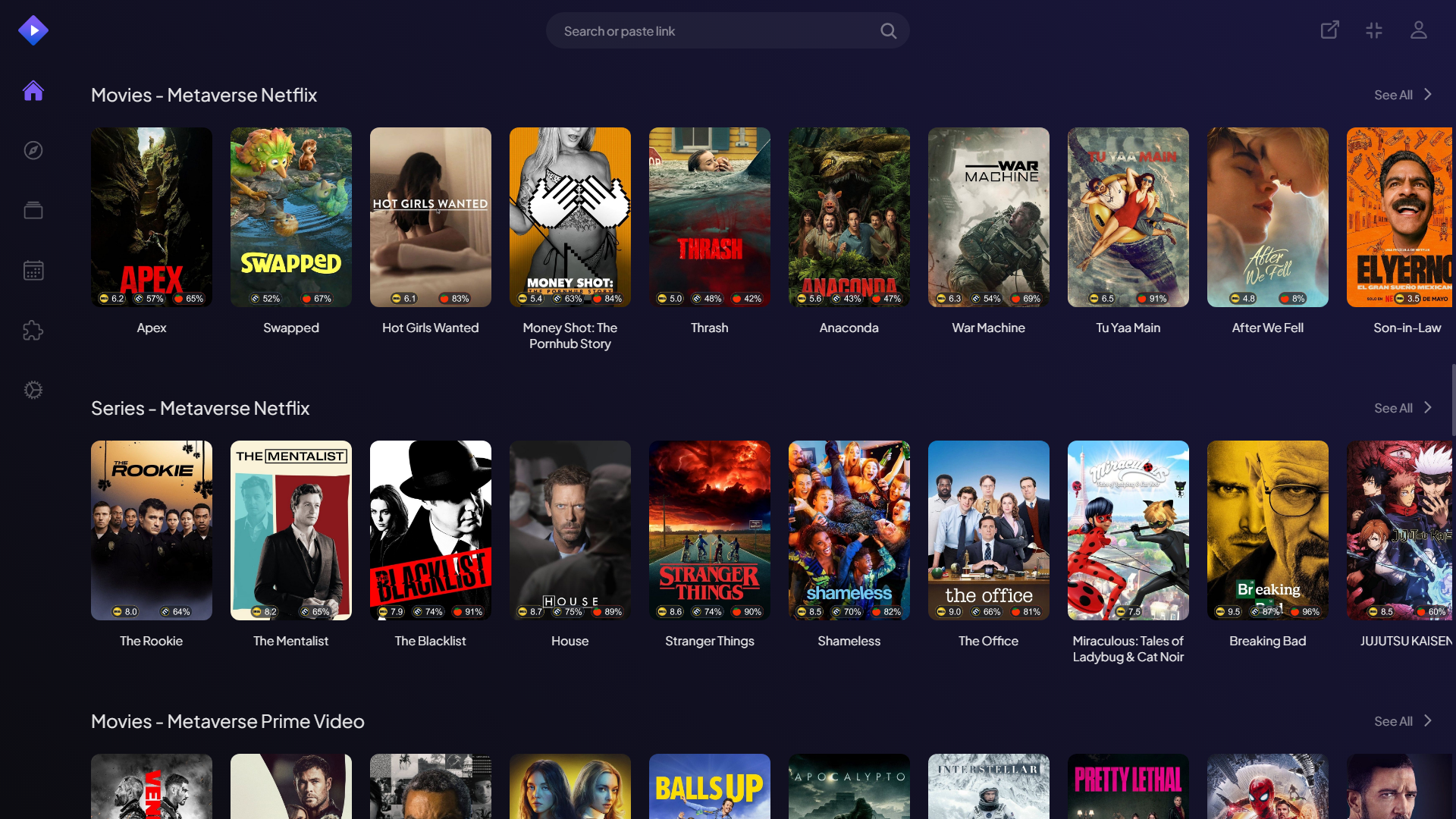
🧱 How It Works
Metaverse acts as a "Catalog & Meta" provider. When you browse a catalog in Stremio:
- Request: Stremio requests a catalog (e.g., "Metaverse Tamil") from the addon.
- Discovery: The addon queries TMDB using specialized filters (language, provider, company).
- Enhancement: Metadata is fetched and enhanced with IMDb IDs and premium posters (via RPDB).
- Delivery: A list of "Meta" objects is sent back to Stremio.
- Playback: When you click a movie, Stremio uses the IMDb ID provided by Metaverse to find streams from other addons you have installed (like Torrentio, Orion, etc.).
Stremio App
    ↓
Metaverse Addon (Catalog & Meta)
    ↓
TMDB / RPDB (Fetch Data)
    ↓
Metaverse Returns IMDb IDs
    ↓
Stremio asks Stream Addons
    ↓
Playback Begins 🎬
📂 Supported Catalogs
| Category | Catalogs Included |
|---|---|
| Streaming Giants | Netflix, Prime Video, Apple TV+, Hulu |
| Regional Cinema | Malayalam, Tamil, Hindi |
| Studios & Networks | Marvel, DC, SonyLIV, Zee5 |
| Global Hits | Popular Movies, Popular Series |
🛠 Installation & Setup
1. Prerequisites
- Node.js (v14 or higher).
- TMDB API Key (Required).
- RPDB API Key (Recommended for best experience).
2. Local Setup
-
Clone the repository:
git clone https://github.com/forzayt/Metaverse_Stremio_Addon.git cd Metaverse_Stremio_Addon -
Install dependencies:
npm install -
Configure Environment: Create a
.envfile in the root:TMDB_KEY=your_tmdb_api_key RPDB_KEY=your_rpdb_api_key PORT=7000 -
Start the Addon:
npm start
3. Usage in Stremio
- Open Stremio.
- Go to the Addons section.
- Paste your manifest URL:
http://localhost:7000/manifest.json(or your deployed URL). - Click Install.
📦 Technical Architecture
- Runtime: Node.js with Express.js.
- SDK:
stremio-addon-sdkfor seamless integration. - Data Sources:
- TMDB: Core metadata, discovery, and search.
- Cinemeta: Fallback metadata for detailed views.
- RPDB: Premium poster artwork.
- Optimization:
- Concurrent API processing in batches.
- Time-based memory caching for discovery results.
- Automated API error handling and cleanups.
⚖ Legal Disclaimer
Metaverse:
- ❌ Does NOT host or distribute copyrighted media.
- ❌ Does NOT scrape or index illegal sources.
- ❌ Does NOT provide streaming URLs or torrent links.
- ✅ Only aggregates public metadata via official APIs.
All trademarks, movie posters, and metadata belong to their respective owners. Metaverse is a tool for metadata organization and discovery only.
🤝 Contributing
Contributions are what make the open-source community amazing!
- Fork the Project.
- Create your Feature Branch (
git checkout -b feature/AmazingFeature). - Commit your Changes (
git commit -m 'Add some AmazingFeature'). - Push to the Branch (
git push origin feature/AmazingFeature). - Open a Pull Request.
❤️ Support & Community
If you find this project useful, consider supporting the development.
- Website: Metaverse Landing Page
- GitHub: Star this Repo